










Episode - Choose Your Story


Installs
100M+Category
RomanceContent Rating
Teen
Screenshots


Editor Reviews
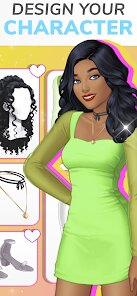
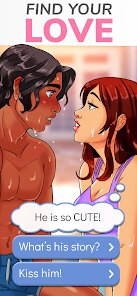
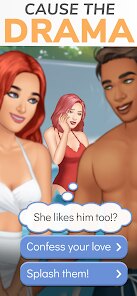
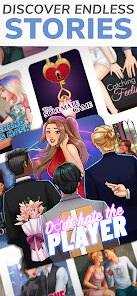
Episode Interactive, the developer behind Episode - Choose Your Story, has carved a unique niche in the mobile gaming world by specializing in interactive storytelling. As a genre-defining title, Episode is a visual novel and choose-your-own-adventure game that blends romance, drama, mystery, and fantasy. The game's sound effects are minimal but effective, with subtle background music that shifts to match emotional beats—whether it's a tense confrontation or a tender moment. The art style is a polished, cartoonish 2D aesthetic, with characters sporting exaggerated proportions and vibrant colors that pop on mobile screens. However, the art can sometimes feel repetitive, with limited animation and expression variations, which may break immersion during longer play sessions. The storyline is the game's heart, offering hundreds of episodes across genres like "The Billionaire Bachelors" or "College Crush," but the writing quality varies wildly—some stories are gripping, while others feel clichéd or rushed. A special gameplay technique is the "choice system," where your decisions impact affection meters with characters, sometimes unlocking hidden endings or branching paths. For example, choosing to flirt with a villain might lead to a betrayal arc, while ignoring them keeps a loyal ally. Player choices are tracked via a "relationship bar" that updates in real-time, adding a layer of strategic planning. On the downside, the game heavily monetizes through "gems" and "passes," locking key narrative flags or special outfits behind paywalls, which can frustrate players who want a free experience. Overall, Episode excels in delivering escapist fantasy with high replayability due to its branching paths, but its reliance on microtransactions and inconsistent writing holds it back from being a top-tier narrative game. It's a guilty pleasure for romance fans who don't mind grinding or spending to unlock the best story beats, but purists might find the pacing too shallow.
The sound design, though sparse, complements the art by using ambient noise like rainfall or crowd chatter to set scenes. The music tracks are loops that fit the mood but can become repetitive during long play sessions. The development team at Episode Interactive has prioritized diversity, offering LGBTQ+ storylines and customizable avatars with inclusive skin tones and hairstyles, which is a plus for representation. However, technical issues like occasional app crashes or slow loading times for episodes can disrupt the flow. The community aspect, including user-generated stories via the "Episode Official" platform, adds depth, letting players become writers themselves. This feature is a double-edged sword, as amateur stories often suffer from poor grammar or pacing, but gems like "The Black Magician" showcase true creativity. For a mobile game, Episode is a solid entry in interactive fiction, but it's best enjoyed in short bursts due to its episodic structure.
A core critique is the "ticket" system, which limits free episodes per day, pushing players to wait or pay. This design choice prioritizes profit over player experience, making it hard to binge-read. Despite this, the game's social features, like community forums and story ratings, foster a loyal fanbase. If you can overlook the paywalls and embrace the melodrama, Episode offers a fun, casual escape with enough agency to feel personal. It's not for hardcore gamers seeking complex mechanics, but for those who love choosing their own path in soap-opera-style narratives, it's a guilty pleasure that delivers.
How to play?
🎮 Step1: Download the game from your app store (iOS or Android) and open it. Upon launch, you'll be prompted to sign up with an email or connect via Facebook for save data. Skip the tutorial if it feels pushy—focus on the main menu where "Stories" tab is your gateway.
👤 Step2: Create your character by tapping "Customize" in the avatar screen. Pick a name, choose your gender (male/female/other), and adjust facial features, hair, and outfits. This design is permanent for each story, so make choices that match your playstyle. Save your avatar to proceed.
📚 Step3: Select a story from the "Featured" or "Popular" list. Start with a free, high-rated tale like "The Big Oh" or "Dare to Dream" to avoid early paywalls. Tap the episode to load it—each story has 10-30 chapters, but you only get one free ticket per hour, so plan your sessions wisely.
⬆️ Step4: Read the opening scene by swiping up to advance text. Pay attention to dialogue options that appear in circles—these are choices affecting your relationship scores. For maximum impact, choose options that align with your goal (e.g., romance, betrayal, or friendship). The game tracks this via a heart icon above characters.
💎 Step5: Use premium choices sparingly. Gems are the in-game currency earned through daily logins, completing episodes, or watching ads. Save them for unlocking "diamond choices" that significantly change plot directions, like saving a character or getting a secret love scene. Otherwise, stick with default options to conserve resources.
🎯 Step6: Manage your tickets and gems by checking the "My Profile" section. Tickets regenerate one per hour, maxing at 2-3, so prioritize playing during breaks. For gem farming, replay old episodes or participate in seasonal events like "Halloween Special" for free bonuses. Avoid buying gems with real money unless you're invested.
💡 Step7: Explore user-generated stories by tapping "Community" in the menu. These are written by fans and often bypass paywalls, offering more choices for free. Search for high-rated originals like "The Royal Romance" for variety. After each episode, review your "Ending Recap" to see how choices branched, then restart or continue to master the narrative.
Download Apk File
Recommend Games








Disclaimer
1 . Ohican does not represent any developer, nor is it the developer of any App or game.
2 . Ohican provide screenshots, historical version Apk, links and other information, which we collected from Google Play. We will also add our own reviews to provide users with more information to choose.
3 . All trademarks, registered trademarks, product names and company names or logos appearing on the site are the property of their respective owners.
4 . Ohican abides by the federal Digital Millennium Copyright Act (DMCA) by responding to notices of alleged infringement that complies with the DMCA and other applicable laws.
5 . We guarantee the security of apk files downloaded from our site and also provide the official download link at Google Play Store and App Store.
6 . If you are the owner or copyright representative and want to delete your information, please contact us contact@ohican.com.
7 . All the information on this website is strictly observed all the terms and conditions of Google Ads Advertising policies and Google Unwanted Software policy.