







Skins Clothes Maker for Roblox


Installs
1M+Category
ToolsContent Rating
Rated for 3+
Screenshots
Editor Reviews
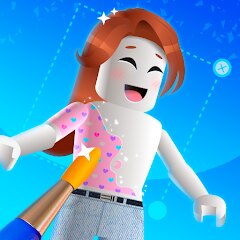
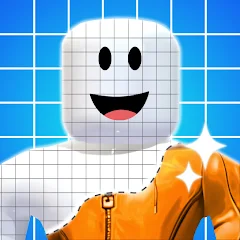
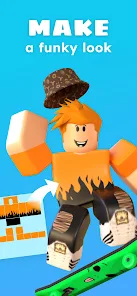
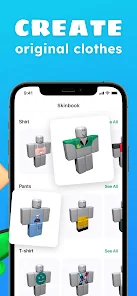
In the vibrant and user-generated universe of Roblox, Pixelvoid Games Ltd has carved out a distinctive niche with 'Skins Clothes Maker for Roblox'. This studio, known for its focus on creative and customization tools within the platform, delivers an experience squarely aimed at fashion-forward players and aspiring digital designers. The game is less a traditional narrative adventure and more a sophisticated sandbox studio, dedicated entirely to the art of avatar apparel creation. It empowers users to become the stylists, crafting everything from casual streetwear to fantastical costumes for their Roblox personas.
The auditory and visual presentation is clean and functional, prioritizing the creator's workspace. The interface is intuitive, with a muted color palette that keeps the focus on your designs. Sound effects are subtle—satisfying clicks for tool selection and gentle swooshes for applying colors—creating a calm, focused atmosphere conducive to creativity. While not graphically intensive, the art style effectively showcases clothing textures and layers, allowing you to preview how your creations will look on a 3D model. The core 'storyline' is the one you write through your designs, whether building a cohesive wardrobe for a specific character concept or producing trendy items for the marketplace.
Mastering the toolset is key. Effective use of layers, mastering the advanced coloring system with gradients and patterns, and understanding how different clothing templates (like shirts, pants, or accessories) work together are crucial techniques. The game excels in providing a powerful, accessible gateway into Roblox's economy of style. However, the experience can feel limited for those seeking guided gameplay, as it is purely a creation tool without minigames or external objectives. Furthermore, navigating the nuances of publishing and selling items on the official Roblox platform involves steps outside the game itself, which can be a hurdle for newcomers. Despite this, as a dedicated clothing design suite, it is an invaluable and well-executed tool for anyone looking to express their creativity within the Roblox metaverse.
How to play?
🎮 Step 1: Launch 'Skins Clothes Maker for Roblox' from your game list and enter the main studio. You'll be greeted with a mannequin avatar and a toolbar full of design options. Take a moment to familiarize yourself with the clean layout.
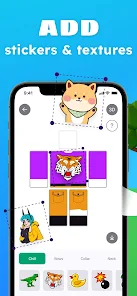
✏️ Step 2: Choose a clothing template to start with. Click on options like 'T-Shirt', 'Pants', or 'Shirt' from the creation menu. This will open a blank 2D canvas that represents the front and back of that clothing item.
🎨 Step 3: Dive into the design tools. Use the 'Brush' tool to draw freehand shapes, the 'Shape' tool for precise circles and squares, and the 'Fill' tool to color large areas. Experiment with the color wheel and the advanced tab for gradients and patterns.
🧩 Step 4: Utilize layers for complex designs. The 'Layers' panel lets you add new transparent layers on top of your base. This is essential for adding details like logos, pockets, or stripes without altering the work underneath. You can toggle layer visibility on and off.
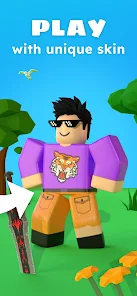
👗 Step 5: Preview your creation in 3D. After working on the 2D template, click the 'Preview' or '3D View' button. This will render your clothing onto the mannequin, allowing you to rotate the model and see how it looks from all angles. Make adjustments back on the 2D canvas as needed.
💾 Step 6: Save your design locally. Once satisfied, use the 'Save' function to store the clothing file on your device. Give it a clear name so you can find it later. This is your personal design archive.
📤 Step 7: Prepare for Roblox. To actually wear or sell your creation, you must upload it to the official Roblox website. The game may provide an 'Export' or 'Upload' guide. You'll need to create a shirt, pants, or other asset on the Roblox Create page and upload your saved image file there to finalize the process.
Download Apk File
Disclaimer
1 . Ohican does not represent any developer, nor is it the developer of any App or game.
2 . Ohican provide screenshots, historical version Apk, links and other information, which we collected from Google Play. We will also add our own reviews to provide users with more information to choose.
3 . All trademarks, registered trademarks, product names and company names or logos appearing on the site are the property of their respective owners.
4 . Ohican abides by the federal Digital Millennium Copyright Act (DMCA) by responding to notices of alleged infringement that complies with the DMCA and other applicable laws.
5 . We guarantee the security of apk files downloaded from our site and also provide the official download link at Google Play Store and App Store.
6 . If you are the owner or copyright representative and want to delete your information, please contact us [email protected].
7 . All the information on this website is strictly observed all the terms and conditions of Google Ads Advertising policies and Google Unwanted Software policy.