







Super Goal: Fun Soccer Game


Installs
50M+Category
OfflineContent Rating
Everyone
Screenshots
Editor Reviews
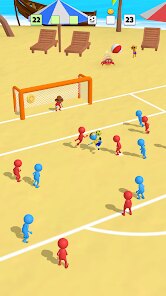
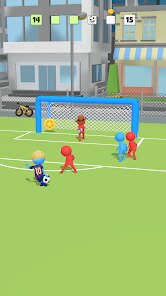
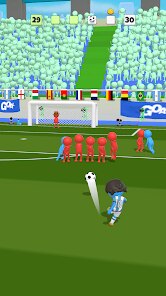
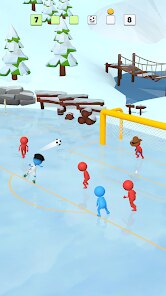
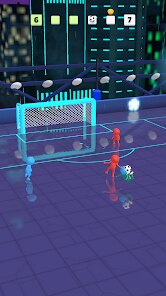
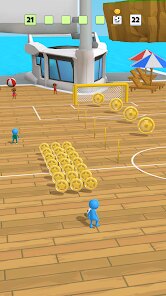
Gamegou Limited, a developer known for its accessible mobile sports titles, brings its casual expertise to the pitch with Super Goal: Fun Soccer Game. This title firmly plants itself in the arcade sports genre, prioritizing fast-paced, simplified action over simulation complexity. From the moment you boot it up, the game establishes its cheerful tone with bright, cartoonish visuals and a peppy, loop-driven soundtrack that, while catchy, can become repetitive during extended play sessions. The art style is clean and colorful, making player characters and the ball easily distinguishable, which is perfect for quick matches on the go.
The experience is light on narrative, forgoing any career mode or story campaign in favor of immediate gameplay. The core loop involves jumping into quick matches or tournaments, aiming to score spectacular goals and unlock new teams and cosmetic items. The special gameplay hook is its emphasis on over-the-top, physics-defying shots and saves. Mastering the swipe-based controls to curve the ball dramatically or perform acrobatic dives is the key to success. While this leads to thrilling moments, the game's simplicity is also its main shortcoming. The lack of strategic depth, such as team management or nuanced tactics, means it can feel shallow after the initial novelty wears off. The ad-supported model can also be intrusive, often interrupting the flow.
Super Goal succeeds in its primary goal: delivering instant, fun soccer action. It's a well-crafted pick-up-and-play title that captures the joy of scoring a fantastic goal without any fuss. However, players seeking depth, longevity, or a more authentic football experience will likely find it lacking. It's a perfect digital snack for a few minutes of distraction, but not a meal that will sustain a dedicated sports gamer's appetite for long.
How to play?
⚽ Step 1: Download and launch Super Goal from your app store. Upon starting, you'll be greeted with a simple main menu. Tap 'Play' to immediately enter a quick match against the AI.
🎮 Step 2: Familiarize yourself with the controls. You control your players automatically; to shoot or pass, simply swipe on the screen in the direction you want the ball to go. A quick, straight swipe produces a standard shot, while a curved swipe applies spin.
👆 Step 3: Start on the lower difficulty to get a feel for the game. Focus on timing your swipes when your player is near the goal. The power of your shot is determined by the length and speed of your swipe.
🥅 Step 4: Learn to defend. When the opponent has the ball, swipe towards your own goal to make your goalkeeper or nearest defender attempt a tackle or a save. A well-timed swipe can result in a spectacular diving save.
💫 Step 5: Master special shots. For a powerful, curling strike, try a rapid, semi-circular swipe. Experiment with different swipe patterns to discover knuckleballs and lobs, which are essential for beating tougher goalkeepers.
🏆 Step 6: Progress to the tournament mode. Use your improved skills to win cups. Winning matches earns you coins, which you can spend in the shop to unlock new, themed teams (like pirates or aliens) for visual variety.
⚙️ Step 7: Visit the settings menu to adjust sound levels or check the controls guide. For a better experience, consider using any earned in-game currency to temporarily remove ads, allowing for uninterrupted gameplay sessions.
Popular Articles
How to Download Games on Google Play for the First Time
For many Android users, downloading a game from Google Play feels simple and automatic. But if you have never used an Android phone before, or if you are switching from another platform, the process can feel confusing at first.36748
What Is an APK File for Android? Everything You Need to Know
By Alvin Sandberg36047
Do Free Robux Generators Work?
By Amy Wire32406
Robux Pricing Guide (2026 Update): How Much Robux Really Costs
By Amy Wire30484
How to Avoid Scams in Roblox
By Amy Wire31530
Rarest Pets in Adopt Me! (2026 Update)
By Scott Malone32925
Disclaimer
1 . Ohican does not represent any developer, nor is it the developer of any App or game.
2 . Ohican provide screenshots, historical version Apk, links and other information, which we collected from Google Play. We will also add our own reviews to provide users with more information to choose.
3 . All trademarks, registered trademarks, product names and company names or logos appearing on the site are the property of their respective owners.
4 . Ohican abides by the federal Digital Millennium Copyright Act (DMCA) by responding to notices of alleged infringement that complies with the DMCA and other applicable laws.
5 . We guarantee the security of apk files downloaded from our site and also provide the official download link at Google Play Store and App Store.
6 . If you are the owner or copyright representative and want to delete your information, please contact us contact@ohican.com.
7 . All the information on this website is strictly observed all the terms and conditions of Google Ads Advertising policies and Google Unwanted Software policy.